
FLUX 3 Image – FLUX AI Image Generator and Editor
flux-3image is an independent web app that lets you create and edit images in your browser with Black Forest Labs' FLUX 3 Image model, with FLUX.2 and FLUX.1 Kontext as extra options.
- Free credits when you sign in with Google
- Daily free credits
- Up to 10 reference images
Independent app — not operated by Black Forest Labs. Runs the genuine FLUX 3 Image model via API, with pay-as-you-go credits.
Native high resolution, up to 10 reference images and precise edits.
FLUX 3 Image on flux-3image at a glance
| Model | Black Forest Labs' FLUX 3 Image, called through the fal API. FLUX.2 [pro] and FLUX.1 Kontext [pro]/[max] are also available. |
|---|---|
| What it does | Text to image, and image editing with 1 to 10 reference images |
| Reference images | 1–10 per request, each at least 256 px on both sides; large uploads are resized before sending |
| Output size | 1K, 2K or 4K; 14 fixed aspect ratios from 21:9 to 1:2, or auto (follows your first reference) |
| Waiting | Results usually arrive while you stay on the page; 2K and 4K take longer than 1K |
| Credits per image | 1K: 2 · 2K: 8 · 4K: 32 · each reference adds 2 |
| Commercial use | Allowed for all users, per our Terms |
| What it can't do | No video, no LoRA training, no model downloads; requests that break the content policy are refused |
What is FLUX 3 Image?
FLUX 3 Image is the image model Black Forest Labs released on October 1, 2026. One model handles both text-to-image and editing. You can describe a new picture in words, or upload 1 to 10 reference images and tell FLUX 3 what to change, combine or restyle. It outputs 1K, 2K or 4K images.
Black Forest Labs (BFL) is the German lab behind the FLUX model family: FLUX.1, FLUX.1 Kontext, FLUX.2 and now FLUX 3. The company first announced FLUX 3 in July 2026 as a multimodal model, and the image model became generally available through its API on October 1.
flux-3image is not part of BFL. It is a separate FLUX AI image generator that sends your request to the FLUX 3 Image API. On top of the API you get a prompt box, an upload tray for references, size and aspect-ratio controls, and a history of your images. No API key, GPU or code needed.
Text to image with FLUX 3

Type what you want to see and the FLUX 3 Image generator renders the whole scene: subject, setting, light and camera angle. The sign above came from a single prompt that asked for a chalkboard reading "Fresh Bread Daily" with "Sourdough · Rye · Focaccia" written underneath. Both lines came out spelled correctly, in chalk-style lettering, on the first try.
That is the part of FLUX 3 people notice first. Short text in quotes (shop signs, labels, headlines, menu boards) usually comes out readable, so you can draft a poster or a product mockup without fixing the lettering in a separate tool.
A few things that help with FLUX text to image:
- Lead with the subject. "A ceramic teapot on a linen tablecloth" works better than a long list of styles followed by the object.
- Name the light and the lens. "Soft window light, 50mm, shallow depth of field" gives FLUX 3 more to work with than "beautiful lighting".
- Put exact words in quotes. Anything in quotation marks is treated as text to render.
- Use hex codes for brand colors. "A mug in #1F6F5C green" pins the color down more precisely than "dark green".
A FLUX AI image editor that leaves the rest alone
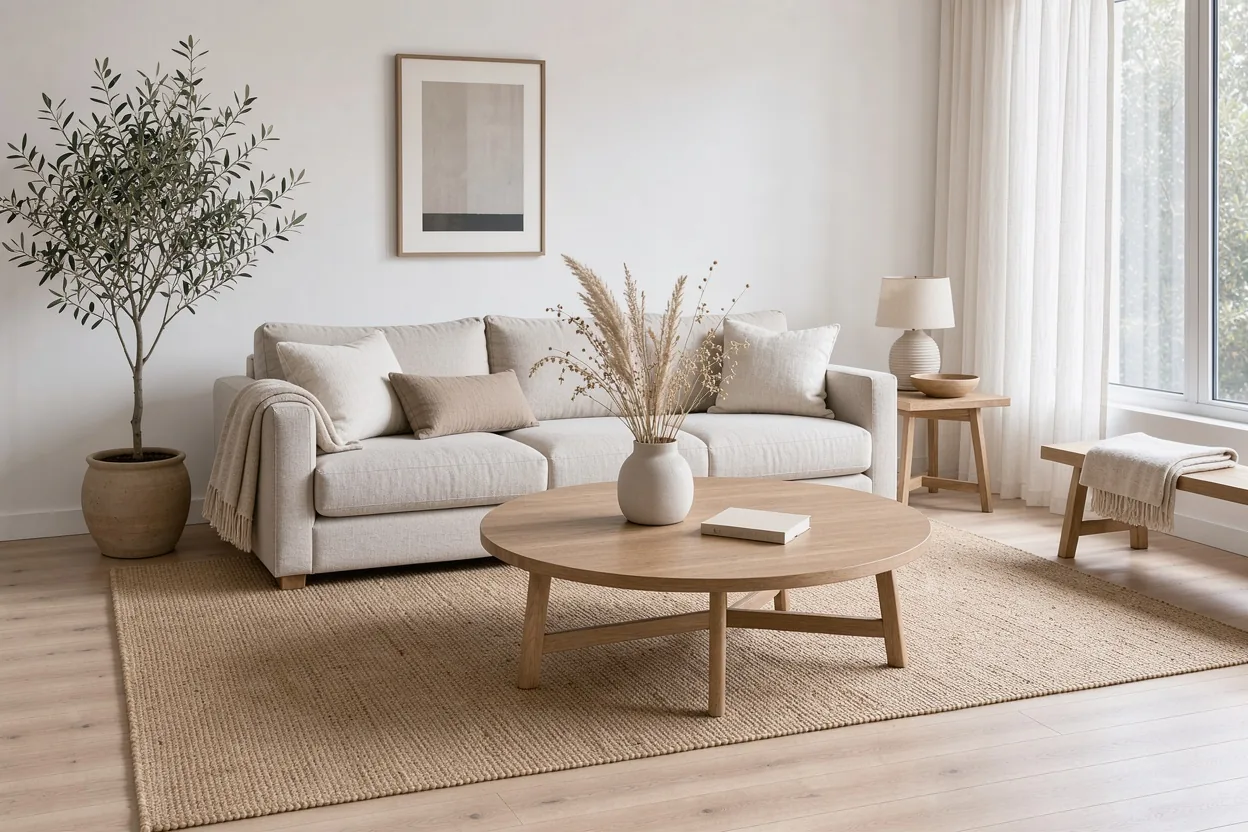
Upload a photo, write the change as an instruction, and FLUX 3 Image edits only what you asked about. The room above is the input. We gave it one sentence: replace the beige sofa with a deep emerald green velvet sofa, and keep everything else as it is.
This is FLUX image to image in its most practical form, and it is what makes FLUX 3 a real FLUX AI image editor rather than a generator with an upload button. You don't paint a mask or pick a region. You name the object ("the sofa", "the sign on the left", "the woman's jacket") and say what should happen to it. FLUX 3 is designed to keep the untouched parts of the picture where they were: furniture, light direction, camera angle, even the folds of a throw blanket.
Edits that tend to work well:
- Recoloring one object, or several at once
- Swapping an object for a different one of similar size
- Replacing the text on a sign, label or cover
- Changing the season, weather or time of day
- Removing a stray object from the background
Before and after: one sentence, one change
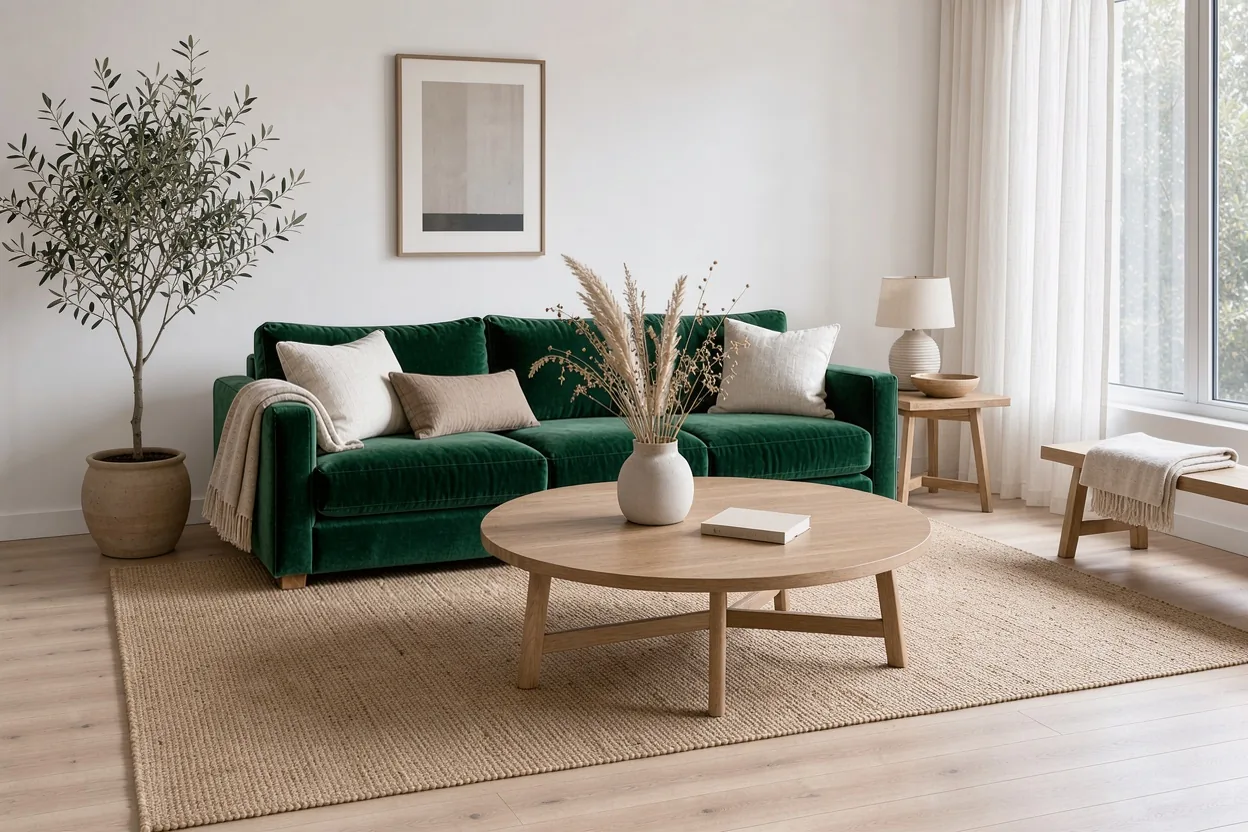
Here is the result. The sofa is now green velvet with the same size, shape and cushion layout. The coffee table, vase, olive tree, lamp, rug and window light match the original. The edit took one request at 1K and used the same aspect ratio as the input, because the aspect ratio was set to auto.
If the first result changes more than you wanted, say what to keep. "Keep the rug, floor and lighting exactly the same" is a normal part of an edit prompt, not a trick. If it changes less than you wanted, describe the new object in more detail.
Combine up to 10 reference images
FLUX 3 Image accepts between 1 and 10 reference images in a single request. You refer to them by position ("image 1", "image 2") and say what each one contributes: the scene, the product, the person, the style or the color palette.
A few ways people use multiple references:
- Product in a scene. Image 1 is a room or a landscape, image 2 is the product. Ask FLUX 3 to place the product on the table on the right and match the light.
- Moodboard to image. Feed in three or four images with the look you want and describe a new scene in that style.
- Same character, new setting. One clear reference of a character plus a prompt for the new scene.
Each reference must be at least 256 pixels on both sides. The first image controls the output shape when the aspect ratio is set to auto. For a deeper walkthrough with examples, see FLUX multi-image reference and FLUX consistent character.
How to use the FLUX 3 image generator
- Sign in. FLUX 3 Image runs on credits, so it needs an account. Accounts created with Google sign-in get free welcome credits.
- Pick a mode. Leave the upload tray empty for FLUX text to image, or add 1 to 10 images to use FLUX 3 as an AI image editor.
- Write the prompt. For a new image, describe the subject, setting, light and framing. For an edit, write one clear instruction and name what should stay the same.
- Choose size and shape. Start at 1K while you test ideas, then move to 2K or 4K for the final version. Pick an aspect ratio or leave it on auto when editing.
- Generate and download. The credit cost shows on the button before you click. Results land in your history, where you can download them or use one as the reference for the next edit.
If a request fails on our side, the credits go back to your balance.
Which FLUX model should you use?
Start with the FLUX 3 Image generator. It is the default here because it does both new images and edits, takes 1 to 10 references and goes to 4K. Switch to FLUX.1 Kontext for quick single-photo edits, or to FLUX.2 [pro] for photoreal work at a lower credit cost than FLUX 3.
| Model | Good for | Page |
|---|---|---|
| FLUX 3 Image | New images and edits, 1–10 references, 4K output | This page |
| FLUX.1 Kontext [pro] / [max] | Quick single-image edits and text replacement | FLUX Kontext |
| FLUX.2 [pro] / [flex] / [max] | Photoreal images, text-heavy designs and edits at 1K or 2K | FLUX 2 |
Separate pages cover FLUX 1.1 Pro and Ultra, FLUX Fill, FLUX.2 [max] and FLUX.2 [flex], with what each model is good at.
What people make with a FLUX AI image generator
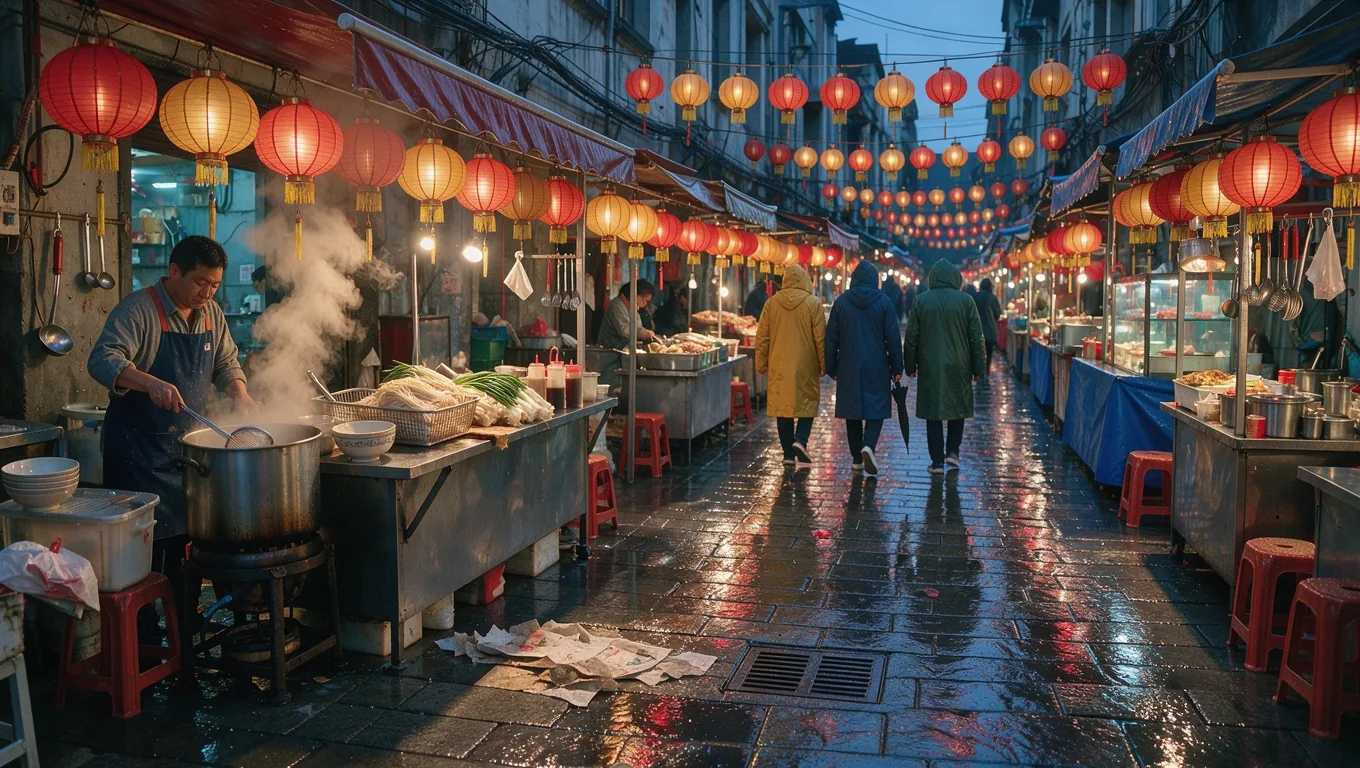
The scene above is a plain text-to-image result. The prompt described an alley market after rain, lanterns overhead and steam from a noodle stall. Most of what people make with a FLUX image generator falls into a few groups:
- Product and e-commerce images. Packshots on clean backgrounds, the same product in several lifestyle settings, or seasonal versions of one hero shot.
- Marketing graphics with text. Posters, social posts, event flyers and menu boards where the words have to be spelled right.
- Interior and real estate concepts. Restyling a room, trying a new wall color or swapping furniture before buying it.
- Illustration and concept art. Characters, environments and storyboards, often kept consistent with reference images.
- Photo fixes. Removing a distraction, changing the weather or replacing a sign in an existing picture.
Is FLUX 3 free to use?
FLUX 3 Image is a paid model. Every image costs credits, because each request goes to the FLUX 3 Image API, which charges per image. Accounts created with Google sign-in get free welcome credits, enough to try FLUX 3 Image before buying anything. FLUX.2 [pro] costs fewer credits per image when you want to stretch them further.
FLUX 3 Image always needs a signed-in account, because every request has a real per-image cost. Free-credit images can take a little longer to come back than paid ones. Credits are only used when an image is delivered: failed or refused requests are refunded.
Prompt tips for FLUX 3 Image
FLUX 3 reads plain descriptive sentences better than lists of keywords. A few habits make results more predictable:
- Describe, don't negate. Instead of "no people", write "an empty street". FLUX 3 Image has no negative prompt field.
- Give each element a place. "A lamp on the left side table, a framed print above the sofa" helps with layout.
- Edit one idea at a time. Three small edits in a row are easier to control than one prompt asking for six changes.
- Test at 1K first. Iterate on the prompt at 1K, then re-run the version you like at 2K or 4K.
How flux-3image runs FLUX 3
flux-3image is an independent app run by Seantin Labs LLC. We are not affiliated with or endorsed by Black Forest Labs; FLUX is their trademark. When you click Generate, your prompt and references go to the FLUX 3 Image model through fal, an API provider that hosts Black Forest Labs' models. The image comes back to your private history on our site.
Each request passes a content check before and after generation. Requests that break the content policy are refused, and refused requests don't use credits.
More FLUX tools
- FLUX KontextEdit a photo with one sentence
- FLUX.2The FLUX.2 model family
- FLUX.2 ProPhotoreal images and precise edits
- FLUX.2 MaxThe most detailed FLUX.2 model
- FLUX.2 FlexPosters and text-heavy images
- FLUX1.1 ProText to image with FLUX1.1 [pro] and Ultra
- Multi-imageCombine up to 10 images in one picture
- Consistent characterThe same character in any scene
- Style transferRepaint any image in a new style
flux-3image FAQ
Is flux-3image made by Black Forest Labs?
- No. flux-3image is an independent web app run by Seantin Labs LLC. It is not affiliated with or endorsed by Black Forest Labs. We send your requests to the FLUX 3 Image model through the fal API and show the result in your account.
What is the difference between FLUX 3 and FLUX 2?
- FLUX 3 Image is the newer model, released on October 1, 2026. It handles text to image and editing in one model, takes 1 to 10 reference images and outputs up to 4K. FLUX.2 is the previous family (klein, pro, flex, max), which also edits with references and costs fewer credits per image.
Can I use FLUX 3 images commercially?
- Yes. Images you create with the FLUX AI image generator on flux-3image can be used commercially by every user, free or paid, per our Terms. You are responsible for what you upload and generate, so don't use other people's photos, logos or trademarks without permission.
Is there a FLUX 3 API on flux-3image?
- No. flux-3image is a web app for creating images in the browser; we don't resell API access. Developers who want to call FLUX 3 Image from their own code can use BFL's own API or an API host such as fal.
Is FLUX 3 open source? Can I run FLUX 3 dev locally?
- Not for images, as of October 2026. BFL has not released open weights for FLUX 3 Image, so there is no FLUX 3 dev checkpoint to download. BFL does publish open weights for some smaller FLUX.2 models, which you can run on your own hardware under their licenses.